2012-04-28 01:57:36 +09:00
M0110/M0110A to USB keyboard converter
======================================
2015-03-18 15:56:07 +09:00
This firmware converts the protocol of Apple Macintosh keyboard **M0110** , **M0110A** and **M0120** into USB. Target of this project is USB AVR controller like **ATmega32U2** and **ATmega32U4** . Using this converter you can revive these retro keyboards with modern computer.
2013-09-21 21:20:05 +09:00
2014-06-22 14:15:38 +09:00
Read README of top directory too.
2016-09-13 04:22:26 +09:00
Pictures of **M0110 + M0120** and **M0110A** with [TMK converter].
2013-09-21 21:20:05 +09:00


2012-04-28 01:57:36 +09:00
2012-12-05 19:45:00 +09:00
- M0110A support was contributed by [skagon@github ](https://github.com/skagon ).
- M0120 also is supported. keys(+ * / and ,) on M0120 are recognized as cursor keys.
2012-04-28 01:57:36 +09:00
2013-08-04 16:13:51 +09:00
Update
------
2013-09-21 21:20:05 +09:00
- 2013/08: Change port for signals `PF` to `PD`
- 2013/09: Change port again, it uses inversely `PD0` for data and `PD1` for clock line now.
2014-06-22 14:15:38 +09:00
- 2014/06: Change keymaps
2015-03-18 15:56:07 +09:00
- 2015/03: Add support for "International"(ISO) keyboard(keymap_intl.c)
2016-09-13 04:22:26 +09:00
- 2016/09: Unimap support - keymap editor on web browser
2013-08-04 16:13:51 +09:00
2016-09-13 04:22:26 +09:00
Hardware
--------
You can buy preassembled [TMK converter] or make yourown with AVR dev board like PJRC [Teensy].
Port of the MCU `PD1` is assigned to `CLOCK` line and `PD0` to `DATA` by default, you can change pin configuration with editing `config.h` .
2012-04-28 01:57:36 +09:00
2016-09-13 04:22:26 +09:00
[](http://i.imgur.com/yEp2eRi.jpg)
2012-04-28 01:57:36 +09:00
2013-09-21 21:20:05 +09:00
### 4P4C phone handset cable
Note that original cable used with Mac is **straight** while phone handset cable is **crossover** .
2012-04-28 01:57:36 +09:00
2013-09-21 21:20:05 +09:00
< http: // en . wikipedia . org / wiki / Modular_connector #4P4C >
2012-04-28 01:57:36 +09:00
2013-09-21 21:20:05 +09:00
[Teensy]: http://www.pjrc.com/teensy/
2016-09-13 04:22:26 +09:00
[TMK converter]: https://geekhack.org/index.php?topic=72052.0
2012-04-28 01:57:36 +09:00
2013-09-21 21:20:05 +09:00
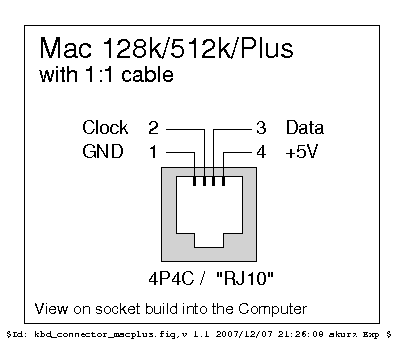
### Socket Pinout
2012-04-28 01:57:36 +09:00
- < http: // pinouts . ru / Inputs / MacKeyboard_pinout . shtml >
2014-01-04 22:45:52 -05:00
### Pull-up Resistor
You may need pull-up resistors on signal lines(`CLOCK` , `DATA` ) in particular when you have long or coiled cable. **1k-10k Ohm** will be OK for this purpose. In that case the converter may not read signal from keyboard correctly without pull-up resistors.
2012-04-28 01:57:36 +09:00
2014-01-04 22:45:52 -05:00
Building Firmware
2012-04-28 01:57:36 +09:00
-----------------
2015-03-18 15:56:07 +09:00
To compile firmware you need AVR GCC. You can edit *Makefile* and *config.h* to change compile options and pin configuration. Also `KEYMAP` option can be used to select keymap.
2012-04-28 01:57:36 +09:00
2012-05-27 14:13:02 +09:00
$ git clone git://github.com/tmk/tmk_keyboard.git (or download source)
2012-04-28 01:57:36 +09:00
$ cd m0110_usb
2015-07-11 17:01:07 +09:00
$ make -f Makefile.rev2 clean
2016-09-13 04:22:26 +09:00
$ make -f Makefile.rev2 [KEYMAP={intl|spacefn}]
2014-06-22 14:15:38 +09:00
2016-09-13 04:22:26 +09:00
Use `Maefile.rev1` for TMK converter rev.1 and Teensy(ATMega32u4), instead.
2012-04-28 01:57:36 +09:00
Keymap
------
2016-09-13 04:33:48 +09:00
To create your own keymap copy existent keymap file to `keymap_<name>.c` and edit it. You can build with `make -f Makefile.rev2 KEYMAP=<name>` .
2016-09-13 04:22:26 +09:00
Or you can edit keymap on web browser and download firmware.
2012-04-28 01:57:36 +09:00
2016-09-13 04:22:26 +09:00
http://www.tmk-kbd.com/tmk_keyboard/editor/
2012-04-28 01:57:36 +09:00
Debug
-----
2015-03-19 06:39:13 +09:00
You can use [PJRC HID listen ](http://www.pjrc.com/teensy/hid_listen.html ) to see debug output. The converter has some functions for debug, press `<Magic>+H` simultaneously to get help.
2012-12-03 15:56:59 +09:00
2015-03-19 06:39:13 +09:00
- Magic combo: `Shift+Option+⌘` or `Shift+Option+Ctrl` (`Shift+Alt+Gui` or `Shift+Alt+Control` )


