|
|
||
|---|---|---|
| .. | ||
| binary | ||
| config.h | ||
| ibmpc_usb.c | ||
| ibmpc_usb.cpp | ||
| ibmpc_usb.h | ||
| ibmpc_usb.hpp | ||
| Makefile | ||
| Makefile.at90usb1286 | ||
| Makefile.atmega32u2 | ||
| Makefile.atmega32u4 | ||
| README.md | ||
| unimap_plain.c | ||
| unimap_trans.h | ||

IBM PC Keyboard Converter
The converter translates IBM PC keyboard protocols into USB HID to use classic keyboards on modern computer with USB ports. This can supports IBM XT and AT protocols and recognize scan code set 1, 2 and 3 with just one firmware.
This project is intended to integrated existent TMK XT, PS/2 and Terminal keyboard converters.
- IBM XT converter: https://geekhack.org/index.php?topic=94649.0
- PS/2 converter: https://geekhack.org/index.php?topic=14618.0
- IBM Terminal converter: http://geekhack.org/index.php?topic=27272.0
Test in the field and feedback from users are needed to improve firmware code.
Discuss in this thread or on github. https://geekhack.org/index.php?topic=103648.0
You can buy prebuilt TMK converter to support this project here. https://geekhack.org/index.php?topic=72052.0
Keyboard supported
- PC XT keyboard of IBM 5150 5160
- 83-key: 1501100 1501105
- PC AT keyboard of IBM 5170
- 84-key: 6450200 6450225
- PC Terminal keyboard of IBM 5271(3270 PC)
- 122-key: 6110344 6110345 1397000
- 102-key: 1390680 1395764 1392595
- IBM 5576-001
- PS/2 keyboards
- Other IBM PC compatible keyboards
Optionally PS/2 mouses can be supported.
- PS/2 mouse
- Default
- Microsoft IntelliMouse
- Microsoft ExplorerMouse
- Logitech PS/2++
Firmware
Build Firmware
$ cd converter/ibmpc_usb
$ make -f Makefile.<variant> clean
$ make -f Makefile.<variant>
Build Options
Secondary interface and PS/2 mouses can be supported.
In Makefiile:
# IBMPC Options
IBMPC_SECONDARY ?= no
IBMPC_MOUSE_ENABLE ?= no
These options bloat firmware size and you may need to disable other options.
IBMPC_SECONDARY- enables secondary interface for converter with PS/2 Mini-DIN-6 connectorIBMPC_MOUSE_ENABLE- enables PS/2 mouse support
Keymap Editor
You can edit keymap on web browser and download prebuilt firmware here.
http://www.tmk-kbd.com/tmk_keyboard/editor/#ibmpc_usb
Debug
Use hid_listen to see debug outputs from the converter.
https://github.com/tmk/tmk_keyboard/wiki#debug
Converter Hardware
This firmware supports ATMega32u4, ATMega32u2 and AT90USB1286 by default, Teensy2/2++ or ProMicro can be used. Wire microcontroller pins below to keyboard signals, besides VCC and GND. This pin configuration is compatible for Soarer's converter.
Pull up resistors of 1-4.7K Ohm on both Data and Clock line are recommended, without them it won't work in some cases.
- Data PD0
- Clock PD1
- Reset PB6 or PB7
For optional secondary interface use these pins. See PS/2 connector pinouts below.
- Data2 PD2
- Clock2 PD3
Reset
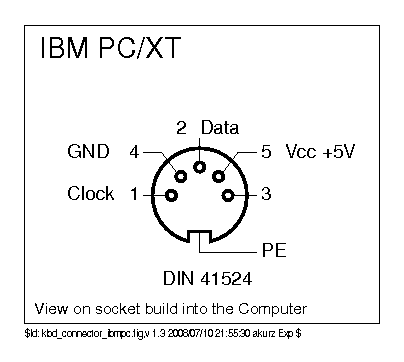
Use pin3 of DIN-5(180-degree) connector for Reset.
Reset should not harm keyboards even if they don't require it. It is safe and recommended to have Reset pin on AT/XT converter.
Old Type-1 IBM XT keyboard and some of XT clones including Zenith Z-150 XT and Leading Edge DC-2014 are known to need Reset pin. AT, PS/2 and Terminal keyboards don't need it.
See this for details: https://github.com/tmk/tmk_keyboard/wiki/IBM-PC-XT-Keyboard-Protocol#keyboard-hard-reset
Connector pinouts
- DIN: https://en.wikipedia.org/wiki/DIN_connector#Circular_connectors
- Mini-DIN: https://en.wikipedia.org/wiki/Mini-DIN_connector
XT - DIN-5(180-degree)
- http://www.kbdbabel.org/conn/kbd_connector_ibmpc.png
- https://allpinouts.org/pinouts/connectors/input_device/keyboard-xt-5-pin/
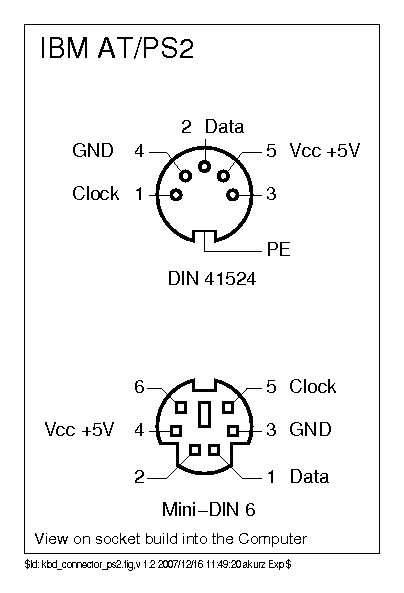
AT - DIN-5(180-degree)
- http://www.kbdbabel.org/conn/kbd_connector_ps2.png
- https://old.pinouts.ru/InputCables/KeyboardPC5_pinout.shtml
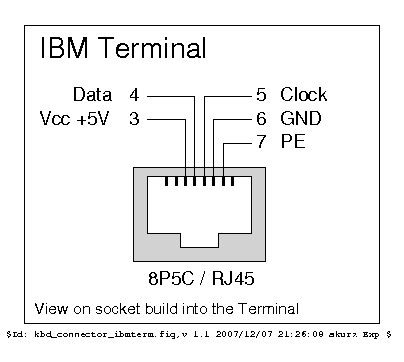
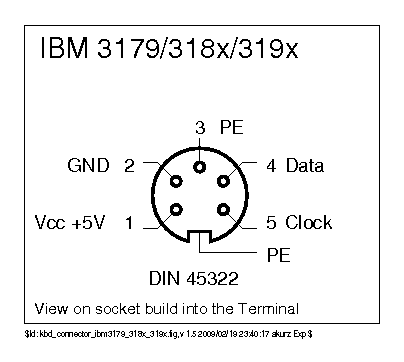
Terminal - DIN-5(240-degree) or DIN-6
- http://www.kbdbabel.org/conn/kbd_connector_ibmterm.png
- http://www.kbdbabel.org/conn/kbd_connector_ibm3179_318x_319x.png
PS/2 - Mini-DIN-6
PS/2 female socket from the front:
  ,--_--.       1: Data
 / o6 5o \      2: Data2
| o4   3o |     3: GND
 - 2o o1 -      4: VCC
  `-___-'       5: Clock
                6: Clock2
For secondary interface use pin2 and pin6 for data and clock respectively. You can use PS/2 Y-splitter cable to access secondary interface.
Scan Code Mapping
This is how the converter map keyboard scan code to USB key.
https://github.com/tmk/tmk_keyboard/wiki/IBM-PC-Keyboard-Converter#default-mapping
Resources
- Source Code: https://github.com/tmk/tmk_keyboard/tree/master/converter/ibmpc_usb
- Discussion: https://geekhack.org/index.php?topic=103648.0
- Conveter impl: https://github.com/tmk/tmk_keyboard/wiki/IBM-PC-Keyboard-Converter
- XT Protocol: https://github.com/tmk/tmk_keyboard/wiki/IBM-PC-XT-Keyboard-Protocol
- AT Protocol: https://github.com/tmk/tmk_keyboard/wiki/IBM-PC-AT-Keyboard-Protocol
- Scan Code: https://github.com/tmk/tmk_keyboard/wiki/IBM-PC-AT-Keyboard-Protocol#scan-codes
- PS/2 Mouse: https://github.com/tmk/tmk_keyboard/wiki/IBM-PC-Mouse