 b13b79300a
https://github.com/tmk/tmk_keyboard/issues/685 https://github.com/tmk/tmk_keyboard/wiki/IBM-PC-AT-Keyboard-Protocol#ibm-5576-code-set-3 Make positon of keys on 5576-001 to fit 122-key layout: 0x13 -> 0x5D // JYEN 0x5C -> 0x51 // RO 0x76 -> 0x7E // Keypad ' 0x7E -> 0x76 // Keypad Dup 0x85 -> 0x68 // Muhenkan -> Keypad , 0x86 -> 0x78 // Henkan -> Keypad = |
||
|---|---|---|
| .. | ||
| binary | ||
| config.h | ||
| ibmpc_usb.c | ||
| ibmpc_usb.h | ||
| Makefile | ||
| Makefile.at90usb1286 | ||
| Makefile.atmega32u2 | ||
| Makefile.atmega32u4 | ||
| README.md | ||
| unimap_plain.c | ||
| unimap_trans.h | ||
IBM PC Keyboard Converter
The converter translates IBM PC keyboard protocols to use classic keyboards with modern computer with USB ports. It supports both IBM XT and AT protocols, and all of scan code set 1, 2 and 3 with one firmware.
This is not finished project and still work in progress as of 2020-03-02. Test in the field and feedback from users are needed to improve firmware code.
You can discuss about this project here.
https://geekhack.org/index.php?topic=103648.0
This project is intended to integrated existent TMK XT, PS/2 and Terminal converters.
- IBM XT converter: https://geekhack.org/index.php?topic=94649.0
- PS/2 converter: https://geekhack.org/index.php?topic=14618.0
- IBM Terminal converter: http://geekhack.org/index.php?topic=27272.0
Keyboard supported
- PC XT keyboard of IBM 5150 5160
- 83-key: 1501100 1501105
- PC AT keyboard of IBM 5170
- 84-key: 6450200 6450225
- PC Terminal keyboard of IBM 5271(3270 PC)
- 122-key: 6110344 6110345 1397000
- 102-key: 1390680 1395764 1392595
- PS/2 keyboards(AT+CodeSet2)
- Clones of above models
Hardware
Firmware supports ATMega32u4 and ATMega32u2 by default, Teensy2 or ProMicro can be used. Wire controller pins below to keyboard signals, besides VCC and GND. This is compatible for Soarer's converter.
- Data PD0
- Clock PD1
- Reset PB6 or PB7 (For some of XT keyboards. Not needed for AT, PS/2 and Terminal)
Pull up resistors of 1-4.7K Ohm on both Data and Clock line are recommended, without them it won't work in some cases.
Reset
Old Type-1 IBM XT keyboard and some of XT clones need this to reset its controller on startup. Many of IBM XT keyboards available are Type-2 and don't need the reset pin.
See this for Type-1 vs Type-2: https://vintagecomputer.ca/ibm-pc-model-f-keyboard-type-1-vs-type-2/
As for clones Zenith Z-150 XT and Leading Edge DC-2014 are known to need this.
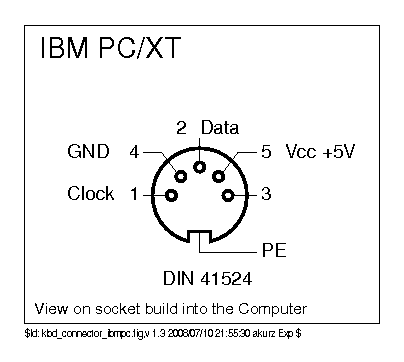
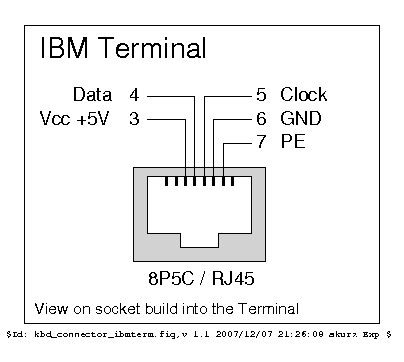
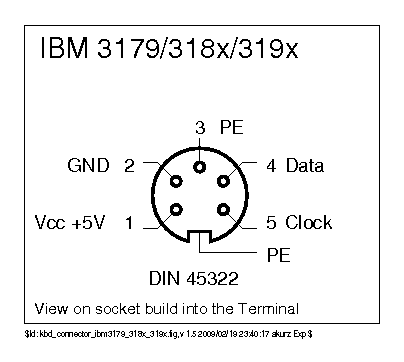
Connector pinouts
XT
- http://www.kbdbabel.org/conn/kbd_connector_ibmpc.png
- https://allpinouts.org/pinouts/connectors/input_device/keyboard-xt-5-pin/
AT
- http://www.kbdbabel.org/conn/kbd_connector_ps2.png
- https://old.pinouts.ru/InputCables/KeyboardPC5_pinout.shtml
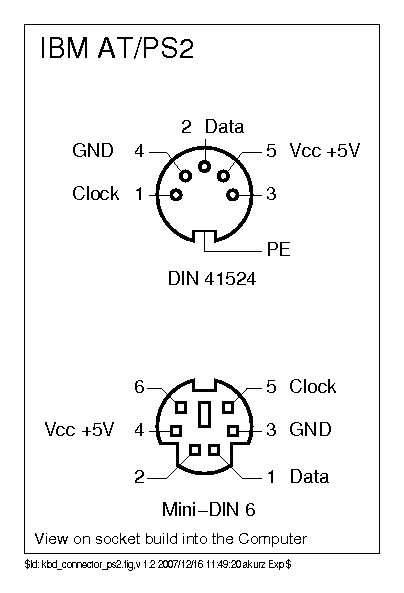
PS/2
Terminal
- http://www.kbdbabel.org/conn/kbd_connector_ibmterm.png
- http://www.kbdbabel.org/conn/kbd_connector_ibm3179_318x_319x.png
Source Code
https://github.com/tmk/tmk_keyboard/tree/master/converter/ibmpc_usb
Build Firmware
$ cd converter/ibmpc_usb
$ make clean
$ make
Keyboard discrimination
This section explains how the converter determines proper protocol and scan code set for keyboard. The converter need to do that before starting to receive and translate scan codes from keyboard.
Keyboard ID
After startup the converter sends 0xF2 command to get keyboard ID and sees how the keyboard responds to the command.
Response from keyboard:
- XT keyboard doesn't support any command and returns no response.
- AT keyboard should respond with 0xFA to the command but returns no keyboard ID.
- PS/2 keyboard should respond with 0xFA to the command, followd by keyboard ID, such as 0xAB86.
- Terminal keyboard should respond with 0xFA to the command, followed by keyboard ID, such as 0xBFBF.
Now we can dscriminate the keyboard and determine suitable protocol and scan code set as described below.
Protocol
- Signals from XT keyboard are recognized by XT protocol.
- Signals from AT, PS/2 and Terminal keyboard are recognized by AT protocol.
Scan code Set
- Scan codes from XT keyboard are handled as CodeSet1.
- Scan codes from AT and PS/2 keyboard are handled as CodeSet2.
- Scan codes from Terminal keyhboard are handled as CodeSet3.
Debug
Use hid_listen to see debug outputs from the converter.
https://www.pjrc.com/teensy/hid_listen.html
Resources
IBM PC Keyboard Protocol Resources:
[a] Microsoft USB HID to PS/2 Translation Table - Scan Code Set 1 and 2
[b] Microsoft Keyboard Scan Code Specification - Special rules of Scan Code Set 1 and 2
[1] PS/2 Reference Manuals - Collection of IBM Personal System/2 documents
[2] Keyboard and Auxiliary Device Controller - Signal Timing and Format
[3] Keyboards(101- and 102-key) - Keyboard Layout, Scan Code Set, POR, and Commands
[4] IBM PC XT Keyboard Protocol
[5] IBM Keyboard Scan Code by John Elliott - 83-key, 84-key, 102-key and 122-key
[6] IBM 1391406 Keyboard - Scan Code Set 2 of 102-key PS/2 keyboard
[7] The IBM 6110344 Keyboard - Scan Code Set 3 of 122-key terminal keyboard
[8] [IBM PC AT Technical Reference 1986]( (http://bitsavers.org/pdf/ibm/pc/at/6183355_PC_AT_Technical_Reference_Mar86.pdf)
[y] TrackPoint Engineering Specifications for version 3E
[z] Soarer's XT/AT/PS2/Terminal to USB converter
TODO
Reset method for rescue
For converter without accesible reset button when magickey combo doesn't work.
Check pin status at powerup:
- if Data and/or Clock are pull down to GND
Force protocol and scan code set
Keyboard discrimination may fail and you have to configure them by hand.